
How Authenticator Apps Work: A Complete Beginner-to-Advanced Guide
Authenticator apps provide an extra layer of security using time-based one-time passwords (TOTP). This blog explains how authenticator apps work, why multiple apps support the same website, and how the underlying security mechanism functions in a simple and practical way.
Introduction
In today’s digital world, passwords alone are no longer enough to protect user accounts. Data breaches, phishing attacks, and credential leaks have made traditional login systems vulnerable. This is where Authenticator Apps come into play.
Authenticator apps are widely used for Two-Factor Authentication (2FA) and Multi-Factor Authentication (MFA). They generate short-lived security codes that change every few seconds, making unauthorized access extremely difficult even if a password is compromised.
This blog explains how authenticator apps work, why multiple authenticator apps work on the same website, and the technology behind them.
What Is an Authenticator App?
An authenticator app is a mobile application that generates one-time passwords (OTPs) used during login. These passwords are:
Time-based
Short-lived (usually 30 seconds)
Generated offline
Unique for each account
Popular examples include Google Authenticator, Microsoft Authenticator, Authy, and many custom enterprise authenticators.
Why Websites Use Authenticator Apps
Websites use authenticator apps to:
Add an extra security layer beyond passwords
Prevent account takeovers
Protect against phishing and credential theft
Meet compliance and security standards
Even if an attacker steals your password, they cannot log in without access to your authenticator app.
The Core Technology: TOTP
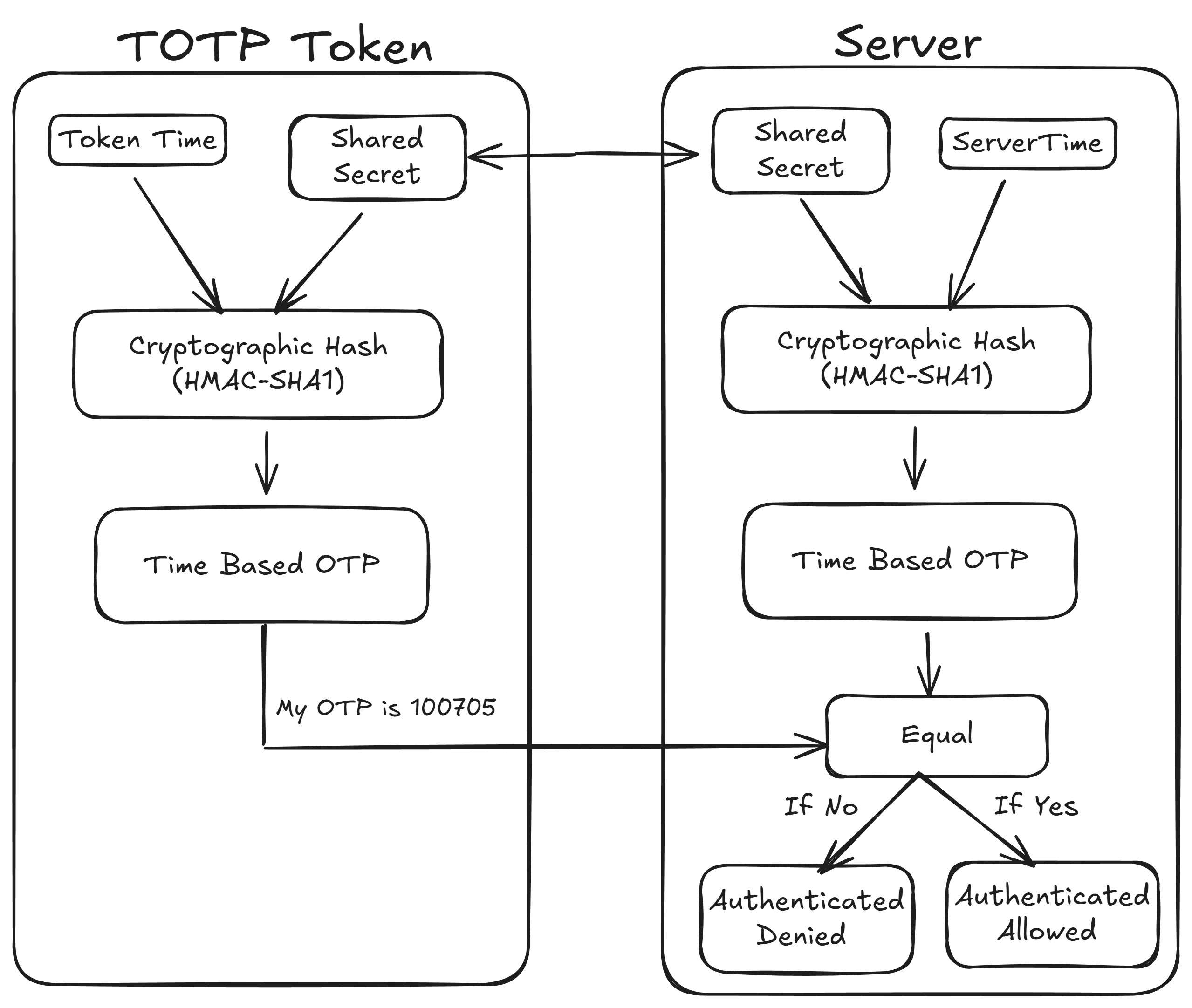
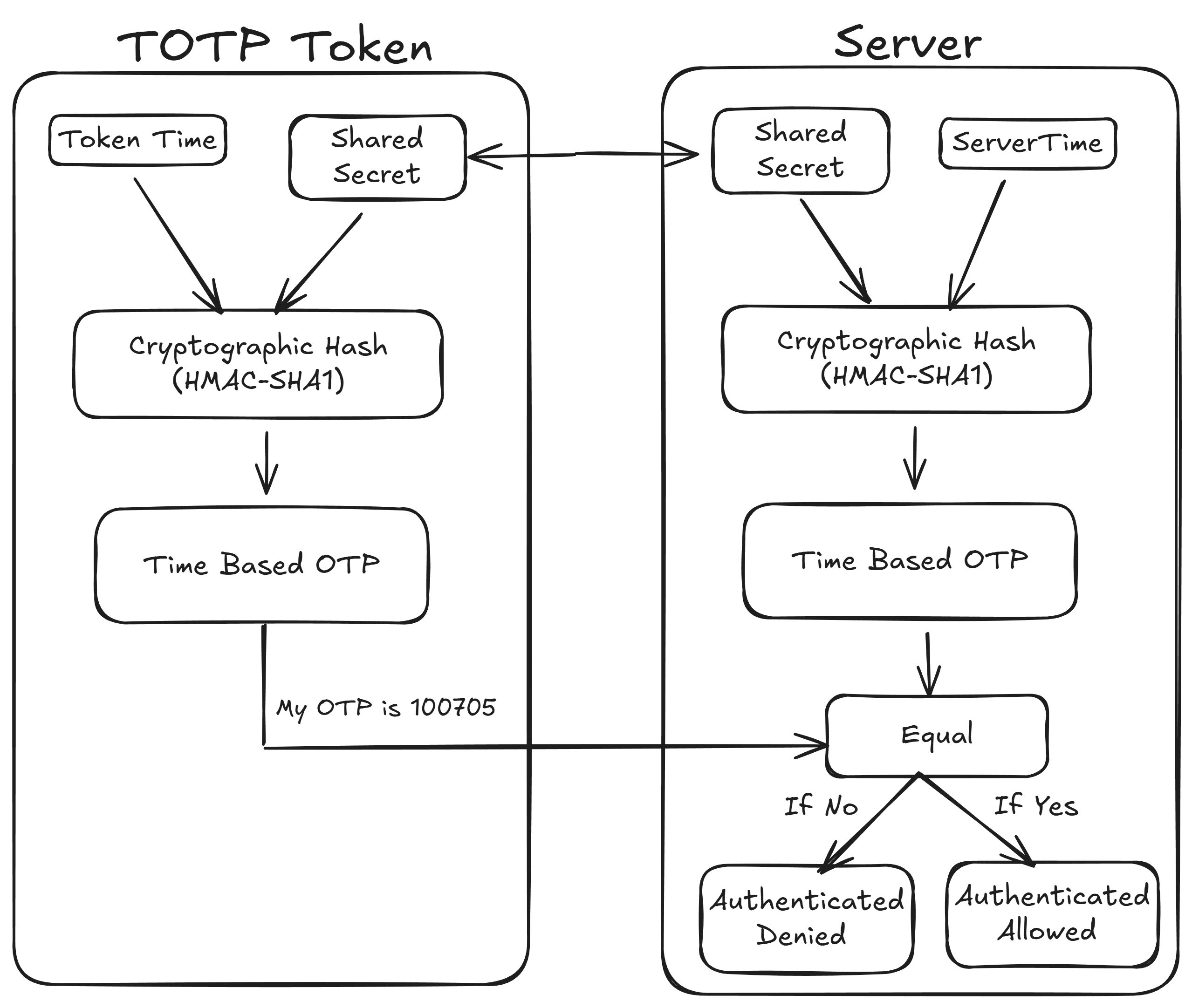
Authenticator apps work using a global open standard called TOTP (Time-Based One-Time Password), defined in RFC 6238.
TOTP generates codes using:
A shared secret key
The current time
A cryptographic hash function (HMAC-SHA1)
Because this is a standard, all authenticator apps generate the same code for the same secret at the same time.
Step-by-Step: How Authenticator Apps Work
1. Enabling 2FA on a Website
When a user enables two-factor authentication:
The website generates a unique secret key
The secret key is embedded in a QR code
The QR code is shown to the user once
2. Scanning the QR Code
The user scans the QR code using an authenticator app.
The QR code usually follows this format:
otpauth://totp/Website:user@email.com?secret=SECRET_KEY&issuer=Website
The app extracts and securely stores:
Secret key
Website name (issuer)
Account identifier (email or username)
3. OTP Generation
Every 30 seconds, the authenticator app:
Takes the stored secret key
Combines it with the current UTC time
Runs the TOTP algorithm
Generates a 6-digit code
This process happens offline and requires no internet connection.
4. Login Verification
During login:
User enters username and password
Website asks for the OTP
User enters the 6-digit code from the app
Server independently generates the same code
If both match, login is successful
Why Multiple Authenticator Apps Work on the Same Website
Many users notice that the same website works with:
Google Authenticator
Microsoft Authenticator
Authy
Custom-built authenticator apps
This happens because:
All apps follow the same TOTP standard
The website only verifies the OTP, not the app
Same secret + same time = same OTP
There is no app dependency or vendor lock-in.
Does an Authenticator App Need Internet?
No.
Authenticator apps work completely offline after setup because they rely only on:
Stored secret key
Device time
Internet is only required during:
Initial QR code scanning
Account recovery or cloud backup (optional)
Security Advantages of Authenticator Apps
OTPs expire quickly
Codes are never transmitted over the network
Secret keys are stored locally
Resistant to phishing and replay attacks
More secure than SMS-based OTPs
What Happens If You Lose Your Phone?
Most platforms provide:
Backup recovery codes
Account recovery via email
Admin or identity verification
Cloud backup (optional, encrypted)
Best practice is to always save recovery codes securely.
Building Your Own Authenticator App
To build a compatible authenticator app, it must support:
otpauth://QR formatTOTP (RFC 6238)
6-digit OTP
30-second time window
HMAC-SHA1 hashing
If these rules are followed, your app will work with almost any website that supports authenticator-based 2FA.
Conclusion
Authenticator apps are a simple yet powerful security solution built on open standards. Their strength lies in time-based cryptography, offline functionality, and universal compatibility.
Understanding how they work helps developers build secure systems and users make better security choices. Whether you use a popular app or build your own, the core logic remains the same and that’s what makes authenticator apps reliable and future-proof.